
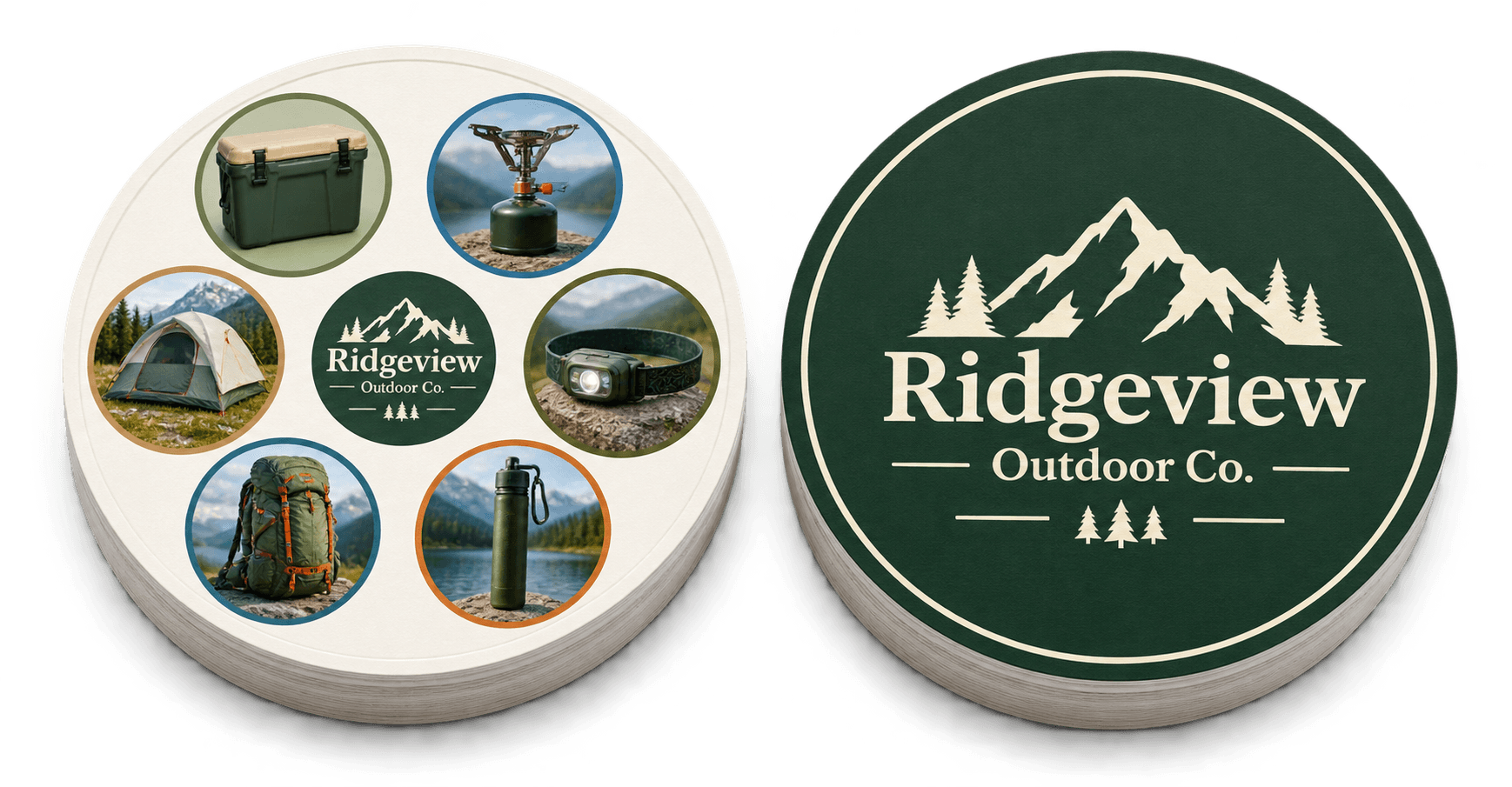
Illustrative concept using the fictional brand Ridgeview Outdoor Co.
You may have dozens — or hundreds — of products worth showing customers.
But putting all of them in a catalog, lining them up on a display wall, or adding them to a booth doesn't necessarily mean people will explore them.
That's the difference between showing a product line and creating an interactive product showcase.
An interactive product showcase gives customers something to do with your products. They can explore them, compare them, try them, configure them, answer questions about them, or even play with them.
The goal isn't interaction for interaction's sake.
The goal is to make more of your product line easier to discover, understand, and remember.
And there are many ways to do it — from a simple hands-on demonstration to turning the products themselves into a physical game.
What Is an Interactive Product Showcase?
An interactive product showcase is a way of presenting products that asks the customer to actively participate instead of simply looking at a static display.
That interaction might mean:
- trying a physical product;
- configuring different options on a screen;
- exploring a 3D model;
- answering questions about products;
- scanning products to uncover information;
- comparing products based on a particular use case;
- completing a product challenge;
- or playing a game built around the product line.
The format can be physical, digital, or a combination of both.
A virtual showroom, for example, can let customers rotate products, zoom in, compare variations, view demonstrations, or explore a wider catalog without requiring every item to be physically present.
At a physical event, the same principle might involve a live demonstration, touchscreen, challenge, game, or hands-on activity.
The technology is optional. Participation is the important part.
Why Static Product Displays Often Aren't Enough
A traditional product display is good at one thing: making products visible.
But visibility doesn't guarantee exploration.
Imagine a company exhibiting 40 products. A visitor might notice the five products closest to them, recognize one they already know, speak briefly with a representative, and leave.
The other products were technically present. But they weren't necessarily explored.
The same thing happens with catalogs. A catalog can contain every product you sell, but customers still need a reason to move from page 3 to page 23.
An interactive experience changes the question from "How do we display all of this?" to "What could we get the customer to do with all of this?"
That's a much more interesting marketing problem.
7 Ways to Make Your Product Line Interactive
There isn't one best format for every business.
The right experience depends on what you sell, where the interaction happens, and what you want customers to understand afterward.
Here are seven approaches.
1. Let Customers Actually Try the Product
Sometimes the best interactive product showcase is the simplest one.
Put the product in the customer's hands.
For physical products, this might mean:
- trying a tool;
- sampling food or drink;
- testing equipment;
- comparing materials;
- assembling something;
- operating a feature;
- or watching and participating in a live demonstration.
The key is to make the interaction about the product — not merely about attracting attention.
A crowd around an unrelated prize wheel may produce traffic. A crowd trying your product is learning what you sell.
2. Organize Products Around a Story Instead of a Grid
A product line doesn't have to be presented as Product A → Product B → Product C → Product D.
Instead, customers can explore it through a story.
For example, a manufacturer could organize products around: the problem → the equipment → the accessories → the result.
An outdoor brand could organize around: arrive → set up camp → cook → explore → sleep.
A beauty company could organize products around routines rather than SKUs. A construction brand could organize products around jobs instead of catalog categories.
This gives customers a reason to move through several products because each one becomes part of a larger narrative.
The products haven't changed. The way customers discover them has.
3. Add Digital Exploration
If your product range is large, configurable, or difficult to display physically, digital interaction can help customers explore more of it.
Options include:
- touchscreen catalogs;
- product configurators;
- QR-enabled displays;
- 360-degree product views;
- interactive comparisons;
- augmented reality;
- 3D product models;
- virtual showrooms.
This can be particularly useful when customers need to understand variations, dimensions, configurations, or products that cannot all fit inside a physical display.
The important question isn't whether the technology looks impressive. It's whether it helps customers understand the product line better.
4. Turn Product Education Into a Challenge
Most companies have things they wish customers understood better.
Perhaps customers don't know the difference between two models. Maybe they overlook certain accessories. Maybe your range serves several different applications.
Instead of explaining everything through another brochure, turn the information into a small challenge. For example:
- Which tool would you use for this job?
- Can you match the accessory to the correct product?
- Which three products belong in this setup?
- Can you identify all five new products in the range?
This changes product education from something customers receive into something they participate in.
And it doesn't necessarily require expensive technology. Cards, boards, physical products, QR codes, quizzes, or simple challenges can all work.
5. Turn the Product Line Into a Game
This takes the idea one step further.
Instead of building a game that happens to have your logo on it, make the products themselves the game content.
Imagine a tool manufacturer. Rather than handing customers another branded pen, the company could create a visual matching game containing drills, saws, batteries, accessories, safety equipment, cases, fasteners, and other recognizable products from its range.
An outdoor brand might use tents, backpacks, lanterns, boots, coolers, and equipment. A food company might use packaging from different product lines. A distributor might use products or brands from its catalog.
Now playing the game requires customers to repeatedly look at the actual product imagery. That's very different from simply putting the company logo on an unrelated promotional item.
This is the approach behind PairPops. PairPops turns 57 product images or brand assets into a custom physical visual-matching game. Every two discs share exactly one matching image, and players race to spot it first.
For companies, that means a product catalog can become something customers can actually play with. See how a promotional product matching game works.
PairPops has a minimum order of 50 game sets, and every design is approved before printing.
6. Make the Trade Show Booth Part of the Product Experience
Trade shows create a particular challenge. You have limited time, limited space, and many other booths competing for the same visitor.
That makes interaction especially useful — but the interaction should ideally lead back to the product.
A useful test is:
If I removed our logo from this activity, would someone still learn something about what we sell?
If the answer is no, the activity may be entertaining but disconnected from the product. If the answer is yes, you're much closer to product engagement.
That could mean demonstrating the equipment, challenging visitors to identify products, comparing configurations, solving a product-related problem, or using your products as the content of a game.
The booth becomes more than a place where your catalog happens to be sitting. You can explore custom trade show giveaway games built around this idea.
7. Create Something Customers Can Take With Them
Many interactive experiences stop the moment the customer leaves. The touchscreen stays at the booth. The demonstration ends. The display stays in the showroom.
Sometimes that's fine. But in other cases it can be useful to extend the interaction beyond the event.
That might be samples, reference cards, product-selection tools, physical challenges, demonstration kits, useful printed material, or a product-based game.
The important distinction is between a souvenir from your company and an object that continues the product experience.
A logo on an object reminds someone who gave it to them. A product-based object can remind them what you actually sell.
Which Interactive Product Showcase Format Should You Choose?
Different formats solve different problems.
| Format | Best for | Uses actual products | Interaction level | Customer can take it |
|---|---|---|---|---|
| Live product demo | Showing performance or features | Yes | High | No |
| Touchscreen / configurator | Large or configurable ranges | Yes | High | Usually no |
| AR / 3D experience | Products needing context or visualization | Yes | High | Digital access |
| Samples | Consumable or trial-friendly products | Yes | Medium | Yes |
| Printed catalog | Detailed product reference | Yes | Low | Yes |
| Product quiz / challenge | Product education | Yes | High | Sometimes |
| Product-based matching game | Discovery, events and giveaways | Yes | High | Yes |
The goal isn't to pick the most advanced option. It's to pick the format that best supports what the customer needs to discover.
Where Interactive Product Showcases Work Best
Interactive product presentation isn't limited to trade shows. The same approach can work across several marketing and sales environments.
Trade Shows
Use interaction to turn booth traffic into product discovery.
Product Launches
Instead of introducing a new product in isolation, let customers explore how it fits into the wider range.
Dealer and Distributor Events
Give partners a way to become more familiar with products, categories, or new additions to the catalog.
Showrooms
Allow visitors to explore more products than can practically be demonstrated one at a time.
Sales Meetings
Make product conversations more participatory instead of relying entirely on slides.
Retail Activations
Give customers a reason to stop, explore, compare, or interact with a category.
Customer Giveaways
Extend product discovery beyond a campaign or event by giving customers something related to the products themselves.
Questions to Ask Before Building an Interactive Product Experience
Before choosing technology, ordering materials, or designing a game, define what the interaction is supposed to accomplish.
What should customers understand afterward?
Is the goal to introduce the range? Explain differences between products? Launch something new? Show breadth? Educate people about applications?
How many products need exposure?
A single hero product needs a different experience from a catalog containing dozens or hundreds of SKUs.
Does the experience need a staff member?
Some experiences depend on a salesperson or product expert. Others can explain themselves. That matters at large events where staff availability is limited.
Does it need to travel?
A permanent showroom installation can be complex. A dealer roadshow or trade-show program may need something portable.
Should the experience continue after the event?
If yes, consider whether part of the experience can leave with the customer.
Are you optimizing for attention or product engagement?
They aren't always the same thing. A visually impressive activation can attract people without teaching them much about the product.
The strongest concept usually connects the activity directly to what the company wants customers to notice.
From Product Catalog to Customer Experience
Your product photography doesn't have to stay inside a catalog.
It can become a demonstration. A comparison tool. A challenge. A digital experience. A conversation. Or even a game.
The important shift is from asking "How do we show customers more products?" to "How do we get customers to interact with more products?"
That's where a static product line starts becoming an experience.
Want to See What Your Product Line Could Look Like as a Game?
You don't need to prepare 57 images before contacting us.
Send PairPops your website and we'll take a look at your product range and show you what the concept could look like. Send Us Your Website →
Frequently Asked Questions
What is an interactive product showcase?
An interactive product showcase lets customers actively explore, compare, try, configure, or engage with products rather than simply viewing a static catalog or display. It can be physical, digital, experiential, or a combination of formats.
How can I make a product display more interactive?
Common approaches include live demonstrations, touchscreens, QR codes, product configurators, AR or 3D visualization, quizzes, hands-on challenges, and games built around the products themselves.
What are some interactive product showcase ideas for trade shows?
Options include live product demos, product challenges, touchscreen configurators, interactive quizzes, AR experiences, hands-on stations, and product-based games that visitors can play at the booth.
Can you turn a product catalog into a game?
Yes. PairPops turns 57 product images or brand assets into a custom physical matching game in which every two discs share exactly one matching image. PairPops has a minimum order of 50 games.