
You've spent three weeks preparing for this new hire. Their laptop shipped last Wednesday. Their Slack invite went out Monday. Their first standup is a Zoom link in a calendar that was emailed to them by HR. And you know, from the remote hires who left in the first 60 days, that the next three weeks will determine whether this one stays.
Remote onboarding is not in-person onboarding with video calls substituted for meetings. It's a structurally different problem. The feedback loops that help you know whether someone is confused — the visible furrowed brow, the hallway question after the meeting — are gone. The accidental introductions that happen when someone walks by a desk don't happen. The social context that builds passively in an office environment has to be engineered deliberately when the new hire is working from a home office in a different city.
Before the tactical guide: the framework that explains why most remote onboarding programs underdeliver.
The Social-Before-Systems Rule for Remote Onboarding
In-person onboarding can get away with a slightly wrong sequence — if day one is too paperwork-heavy, the social integration still happens passively through the week. Remote onboarding cannot absorb sequencing errors. Without ambient office context, every social moment has to be deliberately designed and placed in the right order.
The Social-Before-Systems Rule for remote onboarding: before any IT setup, before any HR paperwork, before any tool training — the new hire needs to see and hear the people they're working with. Not just in a 10-minute team intro that gets buried on slide 14 of the orientation deck. In a dedicated, structured activity that encodes names and faces in the new hire's memory before anything else happens.
Remote new hires who spend day one on systems and paperwork arrive at their first standup unable to connect voices to faces. Remote new hires who spend the first 20 minutes on a structured team introduction activity — something that encodes the team through active engagement, not passive observation — arrive at that standup recognizing the people in the grid.
What In-Person Onboarding Provides for Free (That Remote Must Engineer)
| What In-Person Provides Automatically | What Remote Must Deliberately Replace It With |
|---|---|
| Ambient team culture: overhearing conversations, observing norms | Written culture guides, "how we work" docs, Slack history access |
| Visible confusion: nearby colleagues notice and help | Daily manager check-ins with specific "what's confusing?" questions |
| Serendipitous introductions: "Come meet our new person" | Pre-scheduled 1:1 coffee chats, booked by HR or manager |
| Face-to-name recognition: seeing people in hallways daily | Team photo guide or personalized matching game shipped pre-boarding |
| Lunch and coffee: organic social time | Virtual lunch with a soft agenda; coffee chat budget |
| Office energy: being in a space with others working | Dedicated virtual coworking sessions (optional open Zoom) |
The table above is also a diagnostic. If your remote onboarding program doesn't have a deliberate replacement for each row, that row is a gap. Most programs replace the first three rows but miss face-to-name recognition entirely — and that gap shows up immediately in day-30 pulse surveys as low team connection scores.
Pre-Boarding: The Week Before the Start Date
Pre-boarding matters more for remote new hires than for anyone else. An in-person hire who receives nothing before day one can still walk into an office and have a reasonable first day. A remote hire who receives nothing before day one is logging into a laptop alone, with no team context, no workspace setup, and no sense that anyone was anticipating their arrival.
The remote pre-boarding package:
- Equipment — targeted to arrive 3–5 business days before the start date, not on day one
- System access credentials — tested and confirmed working before day one, with setup instructions in writing
- A personal video message from the manager (not an HR template email)
- Day-one agenda in their calendar before they start — nothing should be a surprise
- Team introduction material — the piece most remote programs omit
The team introduction material is the gap that matters most. Remote new hires join their first video call with a grid of faces they've never seen. Without preparation, the first month is spent learning names reactively — every meeting, the new hire is trying to match the voice to the Slack profile to the face that appeared on screen for 45 minutes. It's expensive cognitive overhead and it's the primary driver of the "I don't really know my team" score that shows up in 30-day pulse surveys.
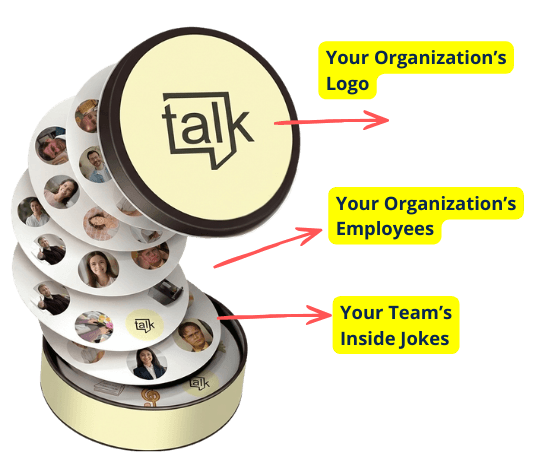
One format that addresses this directly: a personalized matching disc game built from your team's headshots, shipped to the new hire's home before their start date. The game mechanic — racing to find the shared face between two discs — encodes names and faces through active engagement in a way that passive photo review doesn't. A new hire who has played three rounds of the employee onboarding game before their start date walks into their first Zoom recognizing the people in the grid. The team feels less like strangers because they aren't strangers — they're people whose faces have been actively processed.
Order 10–14 business days before the start date to allow for production. Ship it with the welcome kit. It's the only pre-boarding item that directly addresses the social layer problem.
Day One: Fully Structured, on Purpose
Remote day one should be more structured than in-person day one. Not because remote new hires need more hand-holding, but because the ambient structure of an office — someone always nearby, something always happening — doesn't exist when you're working from a home office. An unstructured hour on day one for a remote hire is an hour spent alone wondering what to do. Schedule it.
A remote day-one schedule that works:
- 9:00am — Video call with manager: personal welcome, day-one agenda walkthrough, explicit "what questions do you already have?" (30 min)
- 9:30am — Team introduction call with immediate team: structured icebreaker, reference the pre-boarding game if you sent it (20 min)
- 10:00am — IT walkthrough: all tools confirmed working, Slack channels joined, key contacts bookmarked (90 min)
- 12:00pm — Virtual lunch with 2–3 teammates: video on, loose agenda ("tell me one thing about your role that surprised you when you joined") (45 min)
- 1:00pm — Self-guided exploration: company wiki, Slack history, documentation (60 min)
- 2:00pm — HR and benefits walkthrough (60 min)
- 3:00pm — Role overview with manager: 30-day expectations in writing, first assignment framed (30 min)
- 4:30pm — End-of-day check-in: "How did today feel? What's still confusing?" (15 min)
The end-of-day check-in is the item most likely to get dropped from this schedule. Don't drop it. The 15 minutes at the end of day one — a real question asked with real attention — catches problems before they become patterns. For a remote new hire who spent 8 hours in a home office, it's also the closing signal that says: someone was paying attention to this day.
Week One: Proactive Connection Over "Reach Out When You Need To"
The most common remote onboarding instruction: "Feel free to reach out to anyone on the team if you have questions." This doesn't work. Remote new hires don't know who to reach out to, don't want to interrupt people they've just met, and will ask for help only after the problem has compounded for three days. The team has to reach out first.
Week-one structure:
- Daily 15-minute manager check-in via video (not Slack) — specific questions: "What did you accomplish today? What's confusing? What do you need from me?"
- 4–5 pre-scheduled 1:1 coffee chats with team members (25 min each, no work agenda required) — booked by HR, not the new hire
- Onboarding buddy active throughout week one with explicit brief: "I'm your first Slack DM for anything that feels awkward to ask officially"
- First assignment: completable within week one, clear outcome, doesn't require institutional knowledge the new hire doesn't have yet
- Cross-functional introduction to 2–3 partners they'll regularly work with
The pre-scheduled coffee chats are the item that most People Ops teams know they should do and most skip because it requires calendar coordination. Book them during pre-boarding week. If you wait until the new hire starts to schedule them, it takes three days of back-and-forth and the chats end up in week three.
The Remote Onboarding Decision Tree
Is your remote new hire at risk of early departure? Work through this:
Did you ship team introduction material before their start date? If no — they joined their first call with a grid of strangers. That's a week-one social gap you're now recovering from. Fix it by adding pre-scheduled 1:1 coffee chats in week one (not optional) and a structured team intro activity on day two at the latest. If yes — did they actually engage with it? Check during the day-one team call. If not, run a live version of the activity that day.
Does the new hire have a daily manager check-in for week one? If no — and the manager is available less than twice in the first week — your program has a manager presence gap. This is one of the strongest predictors of remote new hire departure. The minimum fix: add a daily 15-minute video check-in for week one, non-negotiable.
Are week-one 1:1 coffee chats already in the calendar? If no — add them now. They should be booked before the new hire's first day, not during it. If the new hire's week-one calendar has gaps of 2+ hours, those are departure risk windows.
Is a 30-day retrospective already scheduled? If no — put it in the calendar today. The retrospective is what closes the feedback loop and what tells you which of these gaps your program has.
Beyond Week One: Gradual Transition, Not a Drop-Off
Remote new hire integration doesn't end at day five. The transition from high-touch onboarding to normal work cadence should be gradual:
- Weeks 2–3: Daily check-ins become 3x/week; buddy relationship continues; second-tier cross-functional contacts introduced; first feedback conversation with manager
- Day 30: Formal retrospective — what worked, what was missing, what would have helped in week one
- Day 60: Pulse check specifically on team connection: "Do you feel like you know the team? Are there people you haven't really connected with yet?"
The 30-day retrospective is where the program improves. Run it consistently with every remote new hire. Document the outputs. Update the program quarterly based on patterns across cohorts.
3 Remote Onboarding Mistakes That Don't Show Up Until Week Three
These errors don't manifest immediately — they compound:
The information asymmetry gap: the new hire doesn't know what they don't know about how decisions get made, who to ask for what, or where to find things. In an office this fills in passively. Remotely it fills in through deliberate documentation (a "how we work" guide, a decision log, a Slack channel directory) or it doesn't fill in at all.
The async default: managers respond to remote new hires via Slack instead of video because it's faster. By week three, the new hire has had one real conversation with their manager and dozens of text exchanges. Video check-ins aren't overhead — they're the medium through which trust and team belonging form in remote contexts.
The buddy evaporation: the onboarding buddy was active in day one and then returned to their normal workload. By week two the buddy relationship is nominal. Brief the buddy with specific expectations before the new hire starts: daily Slack check-in throughout week one, available for questions in week two, optional coffee chat in week three. Without an explicit brief, buddy programs collapse to nothing.
When Remote Onboarding Isn't the Right Answer
If your company is fully remote and has been for years, this playbook applies. But if your company is hybrid — with most of the team in an office — consider whether a remote new hire in a hybrid context needs a different solution entirely: a supported first week in the office before transitioning to remote. The social integration problem is easiest to solve when both the new hire and the team are in the same room at least once. If that's possible for your role, do it. Remote onboarding at its best still competes with in-person onboarding at its average.
Practical Scenario: Thornwood Digital's Pre-Boarding Fix
Hypothetical example, for illustration only — Thornwood Digital is not an actual PairPops customer, and these figures are not measured results.
Thornwood Digital is a 55-person distributed marketing agency with team members across four time zones. They were losing 1–2 remote new hires per quarter in the first 45 days. Exit interview pattern: "I felt like I didn't know the team. It took weeks before I felt comfortable reaching out to people." Their fix: they added a custom matching game built from team headshots to every remote welcome kit, shipped 7 days before the start date. They also switched from Slack-based day-one onboarding to a structured day-one video schedule. 90-day retention for remote hires improved from 68% to 83% in two cohort cycles. The agency's People Ops lead reported that the 30-day pulse score on "I feel like I know my team" went from 2.8 to 4.1 — the highest improvement of any metric they tracked.
Frequently Asked Questions
What is the biggest challenge in remote employee onboarding?
The absence of ambient social context. In an office, a new hire passively absorbs who people are, how the team communicates, and what the culture feels like just by being present. Remote new hires have no passive channel — every piece of social context has to be engineered deliberately. Most programs replace the logistical elements (meetings, orientation content) but miss the social layer entirely.
How long before a remote employee's start date should you ship a welcome package?
At least 5–7 business days. For personalized items like a team matching game or custom photo guide — anything requiring production before shipping — order 10–14 business days before the start date. A welcome package that arrives on day one or after has missed its moment: the new hire is already in their first meeting and won't engage with the contents until that evening at earliest.
What should a remote employee's first day look like?
Fully structured — more so than an in-person day one. Nothing should be left to "figure it out" or "reach out when ready." Start with a team introduction activity before any IT setup. Close with an end-of-day check-in from the manager. Everything in between should be named and scheduled. An unstructured hour on day one for a remote new hire is an hour spent alone at a desk wondering what to do.
How do you create genuine team connection for a remote new hire?
Three deliberate actions: pre-board with a personalized team game that encodes faces and names before the first video call; book 1:1 coffee chats with 4–5 teammates in week one (HR books these — don't leave it to the new hire); assign an onboarding buddy with a specific brief and explicit expectations. The goal is to replicate the density of social contact that in-person hires get by accident. See also: the employee onboarding game for the specific tool built for this moment.
Should remote new hires be required to have video on during onboarding?
Yes, for the first 30 days — communicated clearly before the start date as an onboarding-specific expectation. Video is the primary channel through which remote new hires build the face-to-name recognition that office environments create passively. New hires who understand the context accept this expectation without friction. After the first month, default to your company's normal video policy.